1. You have 600 products on MedTrade. How many are on your own site?
1.1 Two catalogs. One of them is out of date.
We've watched this play out across dozens of supplier accounts: a meticulously maintained MedTrade catalog — product photos uploaded, specs filled in, price ranges set, MOQs listed — sitting next to a company website that hasn't been touched in six months.
The reason isn't negligence. It's arithmetic. Every new product means two uploads. Every price change means two edits. Every discontinued model means two takedowns. Add a photo on MedTrade? Now add it again on WordPress. Update a description? Update it again on Shopify. A model sells out? You'll remember to delist it on MedTrade — but three months later, it's still sitting on your site with a "Contact us" button that leads nowhere.
Maintaining two synchronized catalogs is a part-time job. For a supplier without a dedicated web team — which is most suppliers — that job never gets done.
1.2 The moment a buyer sees a discrepancy, you've lost them.
A procurement manager searches for a specific probe model. Your website comes up. The price listed is from last quarter. The specs don't match what they just saw on MedTrade two minutes ago.
They don't think "maybe the website is just out of date." They close the tab and click the next search result. In B2B procurement, inconsistent information reads as unreliable supplier. Buyers aren't paid to cross-reference your data sources. One mismatch — even a single number — and the deal dies before it starts.
2. One script tag. One div. Update once, sync everywhere.
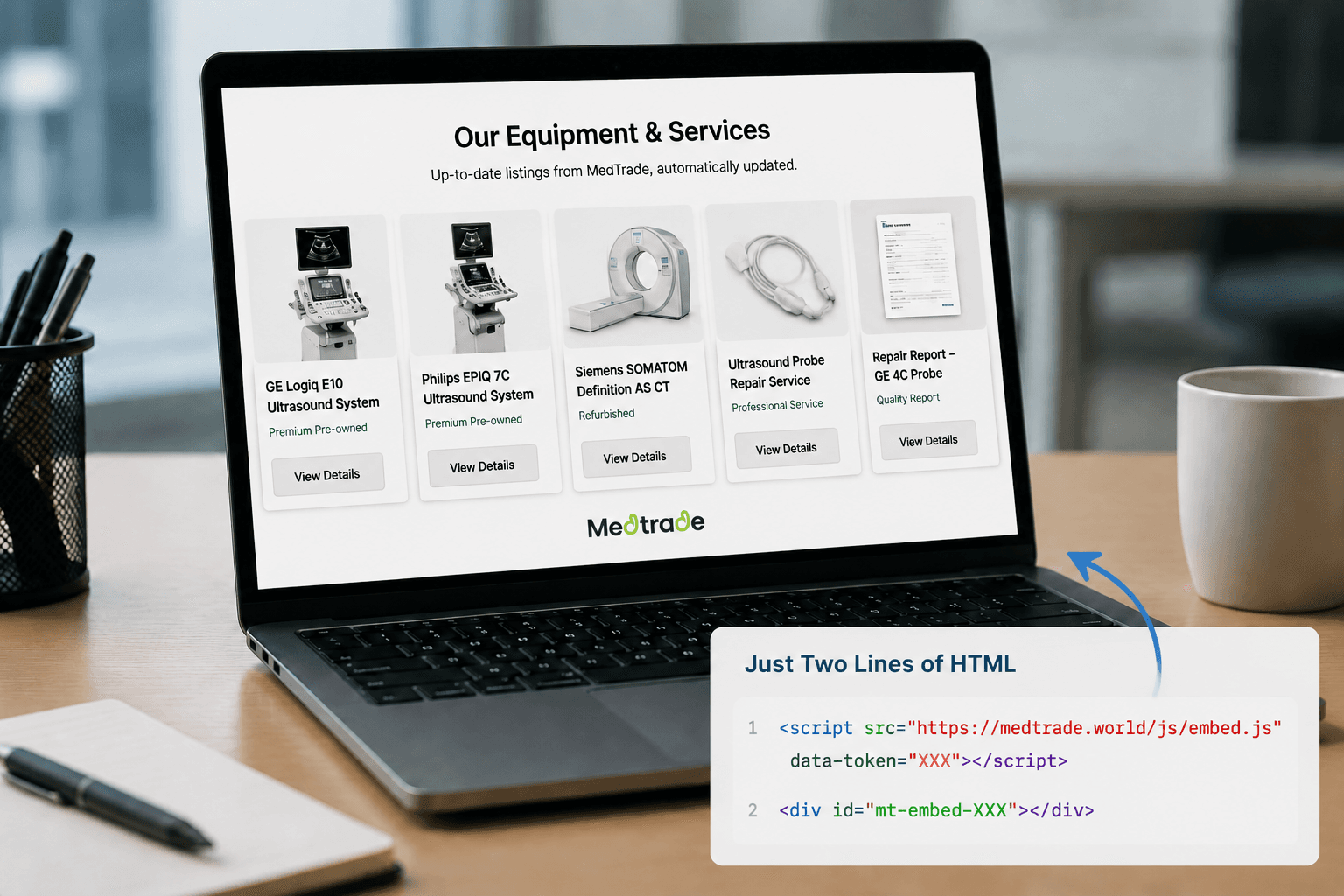
Here's what the Embed Widget does: you maintain your product data in one place — MedTrade. That same data appears on your own website through two lines of HTML. No copying. No double-entry. No remembering.
2.1 Three content types, three drop-in containers
Log into your MedTrade Dashboard. The sidebar has a new item: Embed Code. Open it and you'll see your unique embed token and three ready-to-copy HTML snippets — one for each type of content you manage on MedTrade:
Use all three, or just the ones you need. The code looks like this:
<script src="https://medtrade.world/js/embed.js" data-token="your-token"></script>
<div id="mt-embed-products"></div>
Place the <script> tag once per page — even if you're embedding products, services, and reports together. Place each <div> where you want that section to appear.
2.2 Change something on MedTrade. Your site updates itself.
You tweak a product's price range. Upload a new photo. Update the MOQ. Publish a new Repair Report.
Your website picks it up automatically. No CMS login. No redeployment. No texting the developer who built your site three years ago and moved on to a different industry. The Widget fetches your latest public data from MedTrade each time it loads.
Delist a model on MedTrade? It disappears from your site. No separate cleanup step. No "oh right, I need to remove that from Shopify too."
3. These aren't text links. They're full product cards.
The laziest way to "embed product listings" is to spit out a list of clickable titles inside an iframe. Buyers see a wall of text. To learn anything useful — price, specs, whether this is even the right model — they have to click into each one.
The Embed Widget doesn't do that. Buyers get the decision-critical information right on your site, without a single click.
3.1 Product cards: brand, model, MOQ, price — scannable at a glance
Each product card surfaces six layers of information:
- Product image (first photo auto-selected; fallback placeholder if no image exists — never a blank gap)
- Category label ("Ultrasound Transducer" — buyer knows the equipment type in one second)
- Product title (clickable, opens the MedTrade detail page in a new tab)
- Your company name and location (buyer doesn't have to guess whose inventory this is)
- A four-cell spec grid: Brand / Model / MOQ / Price range — the four numbers that drive a procurement decision, presented directly on the card
- Description excerpt (200 characters, plain text, no markup artifacts)
💡 Here's what changes: on a manually maintained product page, the brand name is buried in a paragraph, the price says "Call for pricing," and the MOQ is something you find out after the first email exchange. The Embed card pulls those four data points into a grid — so a buyer scrolling your page can rule a device in or out without clicking anything. An uncertain buyer doesn't send an inquiry. A buyer who can verify fit in two seconds does.
3.2 Service cards: the buyer knows whether you're the right shop before sending a message
Medical equipment repair services carry even more information asymmetry than products. A buyer lands on a supplier's service page and sees a title and a "Contact us" button. What equipment do you repair? What do you charge? Which regions do you cover? None of it is on the page.
Service cards answer those questions directly:
- "FOR REPAIR" badge in green — visually distinct from the yellow "FOR SALE" badge on product cards
- Supplier name — clickable, linking to your MedTrade profile
- Pricing model, coverage area, service duration — the three things a buyer needs to know to decide whether to reach out
- "Request Quote" button — straight into the inquiry flow
3.3 Report cards: which device, who fixed it, when
A structured, verifiable Repair Report tied to a verified supplier profile carries more weight than a hundred "Quality guaranteed" claims. Each report card shows:
- On-site repair photo (fault photo prioritized; falls back to post-repair photo when no fault photo exists — so buyers see the before-and-after, not a generic product shot)
- Device brand + model + technician name + test date — the full context a buyer needs to evaluate a used device
- Fault description excerpt (150 characters)
- "View full report" link — opens the complete report on the MedTrade Reports Plaza, with a server-signed URL that refuses to resolve if tampered with
4. Works with whatever you built your site with — WordPress, Shopify, Webflow, handwritten HTML
4.1 Your site only needs to do one thing: accept custom HTML
The Embed Widget is a script hosted on MedTrade's servers. It doesn't care what framework or library your site uses. React 18? Fine. A decade-old WordPress theme running jQuery 1.8? Works. A static HTML site you hand-coded in 2019? Also works.
WordPress Custom HTML block. Shopify Custom Liquid block. Webflow Embed component. Wix Custom Code. Squarespace Code Block. Ghost HTML Card — every major site builder and CMS supports custom HTML embeds, and that is the only thing the Widget needs.
You don't download the script to your server, either. It lives on MedTrade, stays current automatically, and is served over HTTPS through a global CDN.
4.2 Your site's styling stays intact
Every supplier's first question about third-party embeds is the same: "Is this going to break my CSS?"
No. The Widget renders inside its own isolated container. Your site uses Tailwind's prose class that adds 2rem of bottom margin to every H3? Widget headings are unaffected. Your global stylesheet colors every link brand-red? Widget links keep their own color. The isolation works in the other direction, too — nothing from the Widget leaks out into your page.
The visual consistency you spent months refining doesn't get compromised by embedding a product grid. This isn't something you configure — it's how the Widget is built.
4.3 Loading experience, responsive behavior, token security — three design decisions worth knowing
Placeholder cards during load, not a spinner. While data is in flight, the Widget renders a set of grey card outlines with a subtle shimmer animation. What the user sees is "content filling in" — not "is this third-party API actually working?"
Responsive out of the box. Single-column on phones, two-column on tablets, auto-filling grid on desktop. You write zero mobile-specific CSS.
Token compromised? Click Regenerate. Old one stops working immediately. The embed token is generated server-side. Anyone holding the token can read your public listings — and nothing else. They can't modify your data. If a former employee leaves with the code, open your Dashboard, click Regenerate, and the old token is dead. Paste the new one into your site. Thirty seconds.
5. Go from login to live in five minutes
5.1 The path is: Login → Embed Code → Copy → Paste → Live
Most "embed your catalog on external sites" features have a user journey that looks like this:
Register as a developer → Create an app → Generate an API key → Read the docs → Write integration code → Handle pagination → Write your own CSS → Deploy → Hit a CORS error → Contact support.
The Embed Widget skips every one of those steps. Your token is generated automatically the first time you open the Embed Code page. Copy the snippet. Paste it into your site's HTML. Done.
5.2 Token leaked? One click kills it.
On the Embed Code page, your token sits next to a yellow Regenerate button. Click it, and you get a confirmation: "Regenerating will immediately invalidate your current token. Any websites using the old token will stop showing your listings. Continue?"
We don't hide the risk. You make the call. Confirm, the new token activates instantly, and you swap the data-token value on your site. It takes longer to read this paragraph than to do it.
6. From inquiry platform to supply data infrastructure
The Embed Widget isn't just another feature. It changes where MedTrade sits in a supplier's stack.
6.1 For suppliers: maintain once, sync to every surface
Say you're an ultrasound probe refurbisher. You have 615 products on MedTrade, 7 repair services, and 3 published Repair Reports.
Until today, you also had to maintain a separate catalog on your own website. Now you don't. MedTrade becomes the single source of truth for your product data — update it here, and your website, your future landing pages, the links you send to clients, all reflect the same information.
A real case: one supplier runs a Next.js site on a $5/month VPS. The front end is a lightweight hand-built interface. All product data — images, specs, pricing — streams in from MedTrade via the Embed Widget. No local image storage. No standalone product database. No CMS. Total site cost: $5 per month.
This isn't about saving money. It's about simplifying architecture. One set of product data serves two channels: inquiry traffic on MedTrade, and organic search traffic on your own domain. Maintain the data once. Both channels benefit. Your website becomes a display layer for MedTrade data — and you only need to manage the data.
6.2 For buyers: search a model on Google, see the same information on your site and on MedTrade
A buyer searches "GE RIC5-9-D probe." The results include a MedTrade product page and your company's website.
The pricing, specs, and availability match — because they're drawn from the same data. The buyer doesn't need to triangulate "is this supplier's website current or abandoned?" Consistency across surfaces is itself a trust signal. No cross-referencing required.
6.3 For MedTrade: platform data starts flowing onto supplier-owned properties
A platform's reach has always been bounded by its own domain's organic traffic. The Embed Widget changes that. It takes MedTrade supply data off medtrade.world and lets it travel.
Every supplier website that embeds the Widget — whether it's a .com, a .co.jp, a WordPress site, or a hand-coded HTML page — becomes a node in the MedTrade supply network. A buyer doesn't need to know MedTrade exists to encounter structured product information, services, and verifiable reports on a supplier's own site. The platform doesn't compete with supplier websites for traffic. It becomes the engine that powers them.
Already a supplier? Log into Dashboard → Embed Code to get your token.
Not on MedTrade yet? Register as a supplier, list your products, and generate your embed token.